.png)
RRFA0308, A25-FA0188A | Anderic Ceiling fan Remote Control for Harbor Breeze Boltz III, Mac III, Reverdy, and Crestwell Fans User Guide

Description
The Anderic RRFA0308 is a 3-speed replacement remote control designed specifically for select Harbor Breeze ceiling fans. It is compatible with multiple models, including the Boltz III, Mac III, Reverdy, Flanagan III, and Crestwell collections (refer to compatible item numbers below). This remote provides full control of fan speeds and light settings exactly like the original Harbor Breeze (A25-FA0188A).
- For Receiver Installation View Guide
Improved design:
- Semi-flush wall mount with a magnet to hold the remote
- The color has been changed to white for a cleaner look that should match most walls and trim.
- Now uses an A23 Battery, a 12V battery for longer-lasting power.
Includes:
- 1x Anderic RRFA0308 remote transmitter
- 1x Wall-mount plate
- 2x Wall-mount screws
- 1x Instructions slip.
Works with:
- Harbor Breeze Color-changing Remote (A25-FA0188A)
- Boltz III, Mac III, Reverdy, Flanagan III and Crestwell Ceiling Fans
- Anderic Color-changing Remote (RRFA0308) - Anderic AM-3L Receiver
Will not work with:
- Harbor Breeze A25-FA0158A | AM-3L (Non Color Changing)
- Flanagan, Cumberland, Lindholm, and Marathon Ceiling Fans.
- Harbor Breeze A25-TX001-R1 | AT-3DL (Non Color Changing)
- Mac II and Mac III
How to install the battery
- Remove the remote from the wall plate
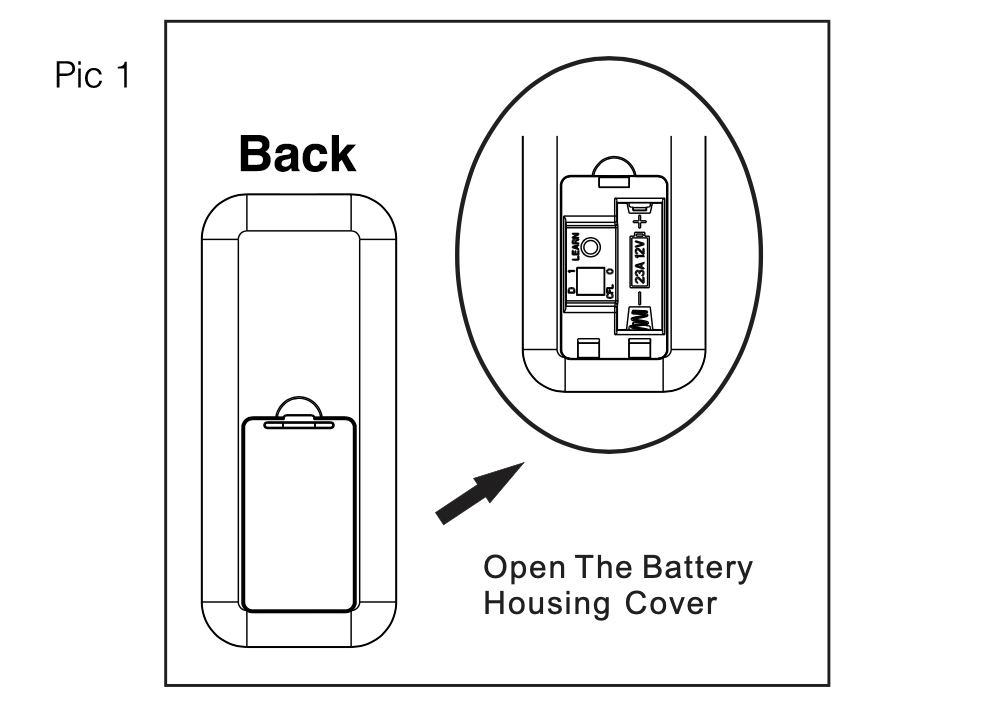
- On the back of the remote, press the tab on the battery cover down towards the cover, then lift it up with your fingernail. (Pic 1)
-
Insert 1 pcs A23 (12V) Battery matching the polarity (see diagram inside the battery compartment)
Pairing Instructions (2-Step)
- Cycle the power to the fan by turning it off, then back on, using the wall switch or circuit breaker.
- Tap the learn key in the remote's battery compartment.
Test the fan functions to ensure the remote is properly controlling the fan
Buttons and Operation

- FAN Power Button: Pressing the power ⏻ button turns the fan OFF or turns the fan ON at the previously selected speed.
- FAN Speed Button "-": Press the "-" to decrease the fan speed.
- FAN Speed Button “+”: Press the "+" to increase the fan speed.
- Sleep Timers: Pressing the 2hr / 4hr / 8hr timer buttons will turn off the fan after 2 hours (2hr), 4 hours (4hr), or 8 hours (8hr). Press the (⏻) button to deactivate.
- Walk Away Light Delay: Pressing this button delays turning off the light for one minute. Allows safe exit from the room. The light blinks to confirm the function is active. Press the light control button to deactivate the light and turn it off.
- Home Shield™: Press and hold the button to activate. Simulates occupancy while away from home. The fan remains off, and the light randomly turns on for at least 5 minutes and up to 20 minutes. The light remains off for 60 minutes between events. The light will blink to confirm that Home Shield is active. Press any button to cancel.
- Variable Breeze: Simulates a natural breeze, as if you were outside.
- Light Control: Tap the button to turn the light on or off. Press and hold the button to dim or brighten the lights.
- Light Color (CCT): Press and hold the button to cycle through the color temperatures from 2200K (warm white) to 6500K (daylight).
- LEARN - Syncs remote control to the receiver (See Pairing Instructions)

Works directly with Lowe's (Harbor Breeze) Ceiling fans below, but not limited to:
- Harbor Breeze Boltz III Easy2Hang 52-in Color-Changing Integrated LED Brushed Nickel with Gray Blades Ceiling Fan With Light | Item # 5497046 | Model # 43350
- Harbor Breeze Boltz III Easy2Hang 52-in Color-Changing Integrated LED Matte Black with Black Blades Ceiling Fan With Light | Item # 5497045 | Model # 43349
- Harbor Breeze Boltz III Easy2Hang 52-in Color-Changing Integrated LED Bronze with Mocha Blades Ceiling Fan With Light | Item # 5497047 | Model # 43367
- Harbor Breeze Mac III Easy2Hang 52-in Color-Changing Flush Mount Matte Black with Mocha/Espresso Blades Ceiling Fan With Light | Item # 5497050 | Model # 43352
- Harbor Breeze Mac III Easy2Hang 52-in Color-Changing Flush Mount Brushed Nickel with Driftwood/Toffee Blades Ceiling Fan With Light | Item # 5497049 | Model # 43351
- Harbor Breeze Reverdy 44-in Color-Changing Integrated LED Flush Mount Brushed Nickel with Driftwood/Espresso Blades Ceiling Fan With Light | Item # 5190464 | Model # 43343
- Harbor Breeze Reverdy 44-in Color-Changing Integrated LED Flush Mount White with White/Driftwood Blades Ceiling Fan With Light | Item # 5190473 | Model # 43344
- Harbor Breeze Reverdy 44-in Color-Changing Integrated LED Flush Mount Matte Black with Espresso/Driftwood Blades Ceiling Fan With Light | Item # 5127881 | Model # 43342
- Harbor Breeze Crestwell 52-in Color-Changing Integrated LED Flush Mount Matte Black with Mocha/Cocoa Blades Ceiling Fan With Light | Item # 5127879 | Model # 43339
- Harbor Breeze Crestwell 52-in Color-Changing Integrated LED Flush Mount Brushed Nickel with Driftwood/Sienna Blades Ceiling Fan With Light | Item # 5127878 | Model # 43338
- Harbor Breeze Flanagan III 52-in Color-Changing Integrated LED Covered Outdoor Matte Black with Black/Driftwood Blades Ceiling Fan With Light, 5992689, 43398
- Harbor Breeze Flanagan III 52-in Color-Changing Integrated LED Covered Outdoor Brushed Nickel with Driftwood/Java Blades Ceiling Fan With Light, 6242053, 43399
- Harbor Breeze Flanagan III 52-in Color-Changing Integrated LED Covered Outdoor White with White/Driftwood Blades Ceiling Fan With Light, 6242054, 43400
- Harbor Breeze Providence Easy2Hang 52-in Color-Changing Dry Black with Matte Black/Cimmeron Blades Ceiling Fan With Light | Item # 6568558 | Model # 43366
- Harbor Breeze Providence Easy2Hang 52-in Color-Changing Dry Matte Black with Matte Black/Cimmeron Blades Ceiling Fan With Light | Item # 5644015 | Model # 43009
- Harbor Breeze Providence Easy2Hang 52-in Color-Changing Dry Brushed Nickel with Gray Oak/Northern Ebony Blades Ceiling Fan With Light | Item # 5644010 | Model # 43008
- Harbor Breeze Providence Easy2Hang 52-in Color-Changing Dry Nickel with Gray Oak/Northern Ebony Blades Ceiling Fan With Light | Item # 6568557 | Model # 43365
- Harbor Breeze Carlow Easy2Hang 52-in White with White/Driftwood Blades Integrated LED Covered Outdoor Ceiling Fan With Light 5 -Blade | Item #5971300 | Model #43292
- Harbor Breeze Carlow Easy2Hang 52-in Brushed Nickel with Oak/Walnut Blades Integrated LED Covered Outdoor Ceiling Fan With Light 5 -Blade | Item #5979033 | Model #43294
- Harbor Breeze Carlow Easy2Hang 52-in White Brushed Gold with White/Driftwood Blades Integrated LED Covered Outdoor Ceiling Fan With Light 5 -Blade | Item #5979035 | Model #43373
- Harbor Breeze Carlow Easy2Hang 52-in Black Brushed Gold with Black/Java Blades Integrated LED Covered Outdoor Ceiling Fan With Light 5 -Blade | Item #5979034 | Model #43372
- Harbor Breeze Carlow Easy2Hang 52-in Matte Black with Black/Driftwood Blades Integrated LED Covered Outdoor Ceiling Fan With Light 5 -Blade | Item #5979032 | Model #43293
ANDERIC RRFA0308 TROUBLESHOOTING:
The Anderic RRFA0308 replacement remote is designed to work with select Harbor Breeze® ceiling fans that use the AM-3L receiver (315 MHz). If your remote or ceiling fan is not working properly, follow the troubleshooting steps below before replacing any parts.
Before You Begin
Verify the following:
- The fan has power at the wall switch and circuit breaker.
- A new A23 (12V) battery is installed correctly in the remote.
- The receiver installed in the fan is an AM-3L (315 MHz) receiver.
- The remote has been paired using the Learn button.
Remote Will Not Control the Fan
Step 1 – Check the Battery
The RRFA0308 requires one A23 (12V) battery.
- Install a brand-new battery.
- Verify the battery polarity matches the diagram inside the battery compartment.
- Ensure the battery is fully seated.
If the indicator light on the remote does not illuminate after installing a new battery, inspect the battery contacts for damage or corrosion.
Step 2 – Re-Pair the Remote
If the battery is good but nothing responds:
- Turn the fan OFF using the wall switch or circuit breaker.
- Wait 10 seconds.
- Turn power back ON.
- Within a few seconds, press the LEARN button inside the battery compartment.
- Test the fan and light controls.
If pairing is successful, all functions should operate normally.
Step 3 – Verify Receiver Compatibility
The RRFA0308 only works with:
AM-3L Receiver
- Frequency: 315 MHz
If your fan uses a different receiver, the remote will not pair or operate the fan.
Fan Does Not Turn On
Check the following:
- Wall switch is ON.
- Circuit breaker has not tripped.
- Power is reaching the fan.
- Receiver wiring is secure.
- Fan wiring inside the canopy is properly connected.
If the light works but the fan motor does not, the fan motor or receiver may require service.
Light Does Not Turn On
Verify:
- The LED light module or bulb is functioning.
- The light kit connector is fully plugged in.
- Wiring between the receiver and light kit is secure.
- The light is not currently dimmed completely.
If necessary, test with a known working light module or compatible bulb.
Light Will Not Dim Properly
Not all LED lights support dimming.
For proper dimming:
- Use the factory-installed LED module, or
- Use only dimmable LED or incandescent bulbs if your fan accepts replaceable bulbs.
Some aftermarket LED bulbs may flicker or fail to dim correctly.
Light Color Temperature Will Not Change
The Light Color (CCT) button only functions on fans equipped with Harbor Breeze color-changing LED light kits.
To change color temperature:
- Press and hold the CCT button.
- Continue holding until the desired color temperature is reached.
If nothing changes:
- Verify your fan includes a color-changing LED module.
- Standard LED or incandescent bulbs do not support this feature.
Fan Speeds Do Not Work Correctly
If the fan will not change speeds or only operates at one speed:
- Verify the receiver is an AM-3L receiver.
- Install a fresh battery.
- Re-pair the remote.
- Inspect all receiver wiring.
- Confirm the fan is not in Variable Breeze mode.
If only High speed works, the receiver may be damaged.
Fan Turns On But Speeds Are Incorrect
If speed changes seem inconsistent:
- Turn Variable Breeze OFF.
- Press the + or − buttons to manually select the desired speed.
- Cycle power to the fan and test again.
Remote Works Intermittently
Possible causes include:
- Weak battery
- Loose wiring
- Electrical interference
- Receiver beginning to fail
Try the following:
- Replace the battery.
- Re-pair the remote.
- Verify receiver wiring connections.
- Stay within normal operating range.
- Remove nearby sources of RF interference if possible.
Sleep Timer Will Not Cancel
The 2-hour, 4-hour, and 8-hour timers can be cancelled by pressing the Fan Power (⏻) button.
If the fan still shuts off unexpectedly:
- Cycle power to the fan.
- Re-pair the remote.
Walk Away Light Delay Does Not Work
This feature delays turning the light OFF for approximately one minute.
If it doesn’t operate:
- Confirm the light is already ON.
- Verify the fan has a compatible Harbor Breeze LED light kit.
- Re-pair the remote.
Home Shield™ Does Not Operate
Home Shield simulates occupancy by randomly turning the light on while the fan remains OFF.
To activate:
- Press and hold the Home Shield button.
- The light will blink to confirm activation.
Press any button to cancel.
If nothing happens:
- Verify the light kit is functioning.
- Re-pair the remote.
Variable Breeze Does Not Work
Variable Breeze automatically changes fan speed to simulate a natural breeze.
If it does not activate:
- Verify the fan is operating normally in manual speed mode.
- Re-pair the remote.
- Confirm receiver compatibility.
Remote Indicator Light Does Not Illuminate
If the LED on the remote never lights:
- Replace the battery with a new A23 (12V).
- Verify correct battery orientation.
- Inspect battery contacts for damage.
- Ensure the battery cover is fully closed.
If the indicator still does not illuminate, the remote may be defective.
Remote Will Not Pair
If the pairing process never completes:
Confirm the receiver is compatible.
The RRFA0308 only pairs with the AM-3L 315 MHz receiver.
Try pairing again.
- Turn power OFF.
- Wait 10 seconds.
- Restore power.
- Immediately press the LEARN button.
Test the original remote.
If:
- The original remote does not work,
- The RRFA0308 does not work,
- Both remotes illuminate normally,
then the receiver is the most likely failed component.
Receivers commonly fail due to:
- Power surges
- Lightning strikes
- Electrical wiring issues
- Age-related component failure
Replacing the receiver is typically required.
Fan Operates By Wall Switch But Not By Remote
This usually indicates one of the following:
- Dead battery
- Remote not paired
- Incorrect receiver
- Failed receiver
Replace the battery, re-pair the remote, and verify receiver compatibility.
Multiple Fans Respond to One Remote
Although uncommon with this model, RF interference can occur if multiple compatible receivers are nearby.
If more than one fan responds unexpectedly:
- Re-pair each fan individually after cycling power to only one fan at a time.
- Ensure only the intended fan is powered during pairing.
Still Having Problems?
Before replacing the remote, verify the following:
- ✓ New A23 (12V) battery installed
- ✓ Fan has power
- ✓ Remote has been paired correctly
- ✓ Receiver is an AM-3L (315 MHz)
- ✓ Wiring connections are secure
- ✓ Original remote has been tested (if available)
If both the original remote and the RRFA0308 fail to operate the fan, the receiver is likely defective and should be replaced.