.png)
RC1475505/04SB | xfinity / Comcast Cable Remote Control User Guide
This article applies to the xfinity RC1475505/04SB cable box remote control.
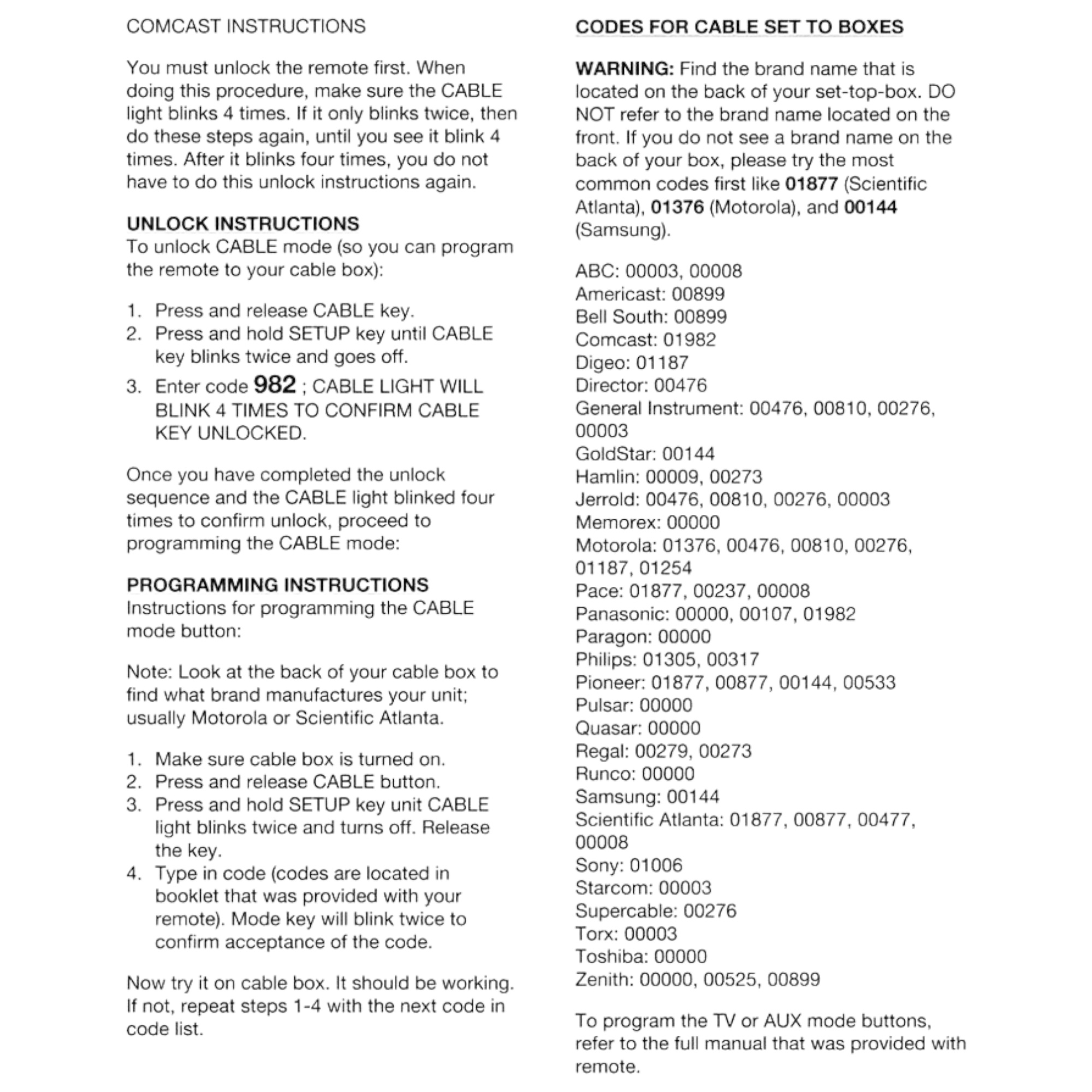
NOTE: You must unlock the remote control before programming. When doing this procedure, make sure the CABLE light blinks four times. If it only blinks twice, then do these steps again, until you see it blink four times. After it blinks four times, you do not have to do this unlock instructions again.
Unlock Instructions
To unlock CABLE mode (so you can program the remote to your cable box):
- Press and release the CABLE key.
- Press and hold the SETUP key until the CABLE key blinks twice and the goes off.
- Enter code 982 - the CABLE indicator light will blink four times to confirm cable key is now unlocked.
Now you can proceed to the Programming instructions to program this remote to your cable box.
Programming Instructions
Note: look at the back of your cable box to find the brand that manufactures your unit, many times it is Motorola or Scientific Atlanta.
- Make sure the cable box is turned on.
- Press and release the CABLE button.
- Press and hold the SETUP key until the CABLE indicator light blinks twice and turns off. Release the key.
- Enter the code from the code list below. Use the code shown for your boxes' manufacturer. The indicator light will blink twice to confirm acceptance of the code.
- Try the remote on your cable box. If it is not working as intended, try a repeating these steps using a different code.
Codes