.png)
893MAX | Anderic Universal Garage Door Opener Remote Control for Liftmaster for Purple, Yellow, Green, Red, and Orange Learning Key User Guide
This article applies to the Anderic 893MAX Universal Garage Door Opener Remote Control
Programming the Remote
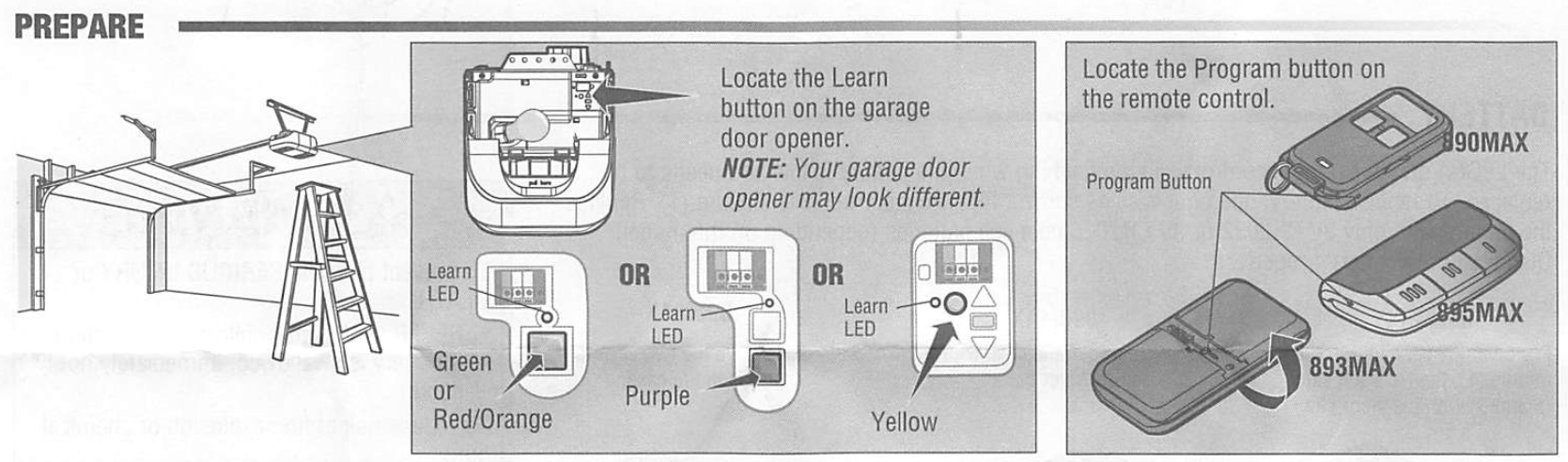
- Press and hold the program button on the remote control until the LED on the front of the remote control turns on

- Press and release the remote control button you wish ot use the number of times that corresponds with the garage door opener type:

- To exit programming mode, press any remote control button except the button that was last programmed

- Press and release the Learn button on the garage door

- Press the remote control button programmed in step 2 until the garage door opener lights flash or two clicks are heard.

- To test, press the programmed button on the remote control.

- Install the visor clip (not applicable for Model 890MAX).

HOW TO USE THE REMOTE CONTROL
Press and hold the button down until the door or gate starts ot move. The remote control will operate from up to 3 car lengths away on typical installations. Installationsand conditions vary, contact an installing dealer for more information. Additional buttons on the remote control can be programmed to operate up to 3 devices such as additional garage door openers, light controls, gate operators or access conrtol systems.

Battery
The LED(s) on your remote control wil stop flashing when the battery is low and needs to be replaced. To replace battery, open the case as shown. Insert battery positive side up (+). Replace the battery with only 3V CR2032 or 3V CR2016 coin cell batteries (depending on the model). Dispose of old battery properly.
