.png)
RRLC16.2 | Anderic Universal Remote Control for Roku Streaming Player and TV User Guide
This article applies to the Anderic RRLC16.2 Universal Remote Control with Learning.
About
The Anderic RRLC16.2 Universal Remote Control is pre-programmed for select Sharp Roku TVs, including model LC-RCRUS-16 (p/n: 398GR10BESP06U). However, if you have a Roku Player, or another brand of Roku TV, this remote requires programming.
NOTE: This remote does not work for Roku Sticks.
Additional Note: This remote is compatible with the CBL01 Security Tether Cable (Sold separately).
Note about App Keys: After programming, some App shortcut keys may not work as expected. Your TV may not recognize the App shortcut key and will do nothing, or may open a different App than expected. This is expected, as different model TVs use different button codes for each app or may not support the app entirely via remote control.

Installing batteries and the wrist strap
Please review the image above.
- Remove the battery cover.
- Insert two AAA batteries (not included), matching polarities as indicated in the battery compartment.
- Loop the wrist strap around the screw hole and hold in place while replacing the battery cover.
Programming Codes for Roku TVs
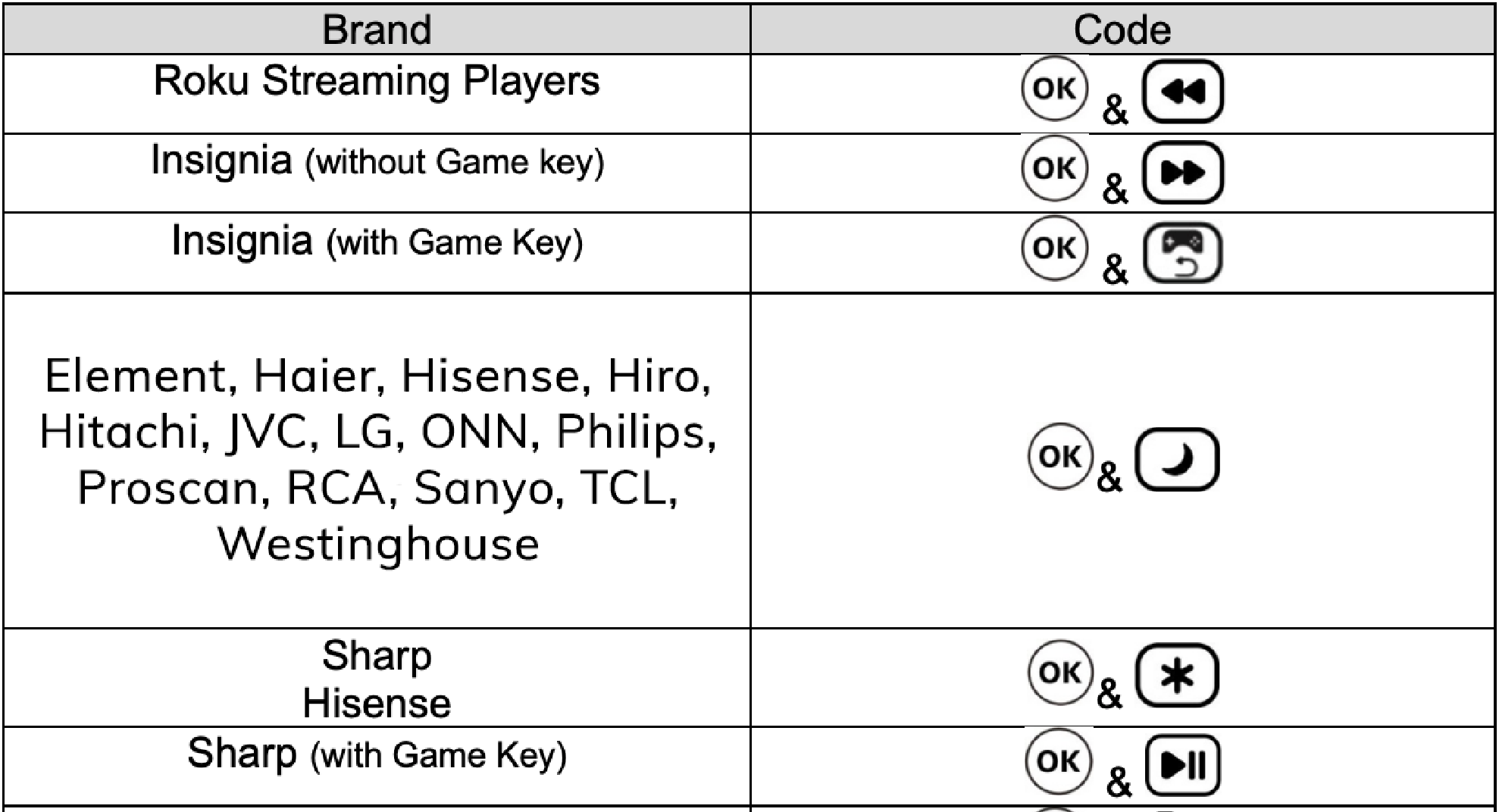
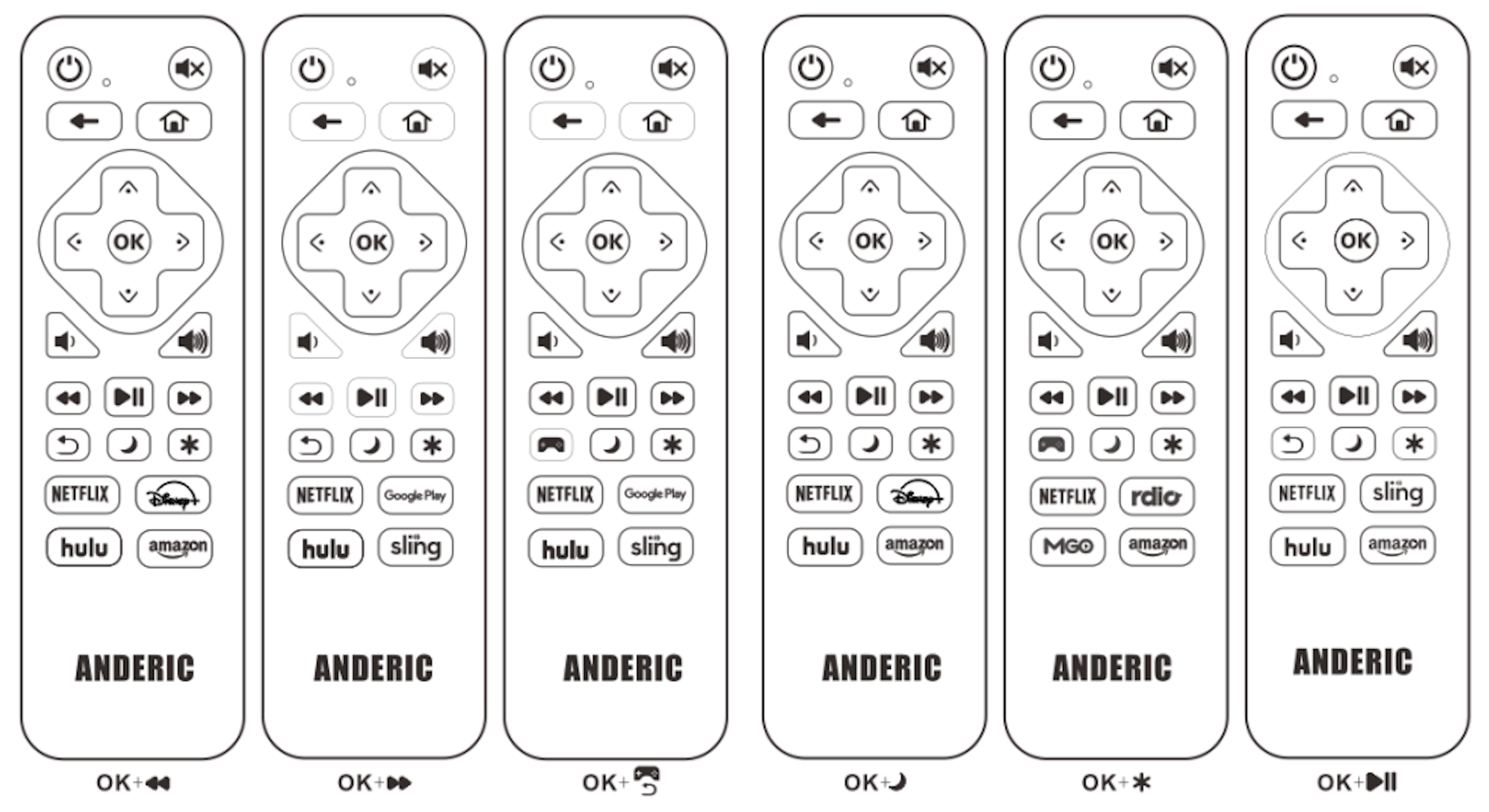
Use the codes below to program your device (TVs manufactured by the brands listed below that have built-in Roku software).
Steps:
- Take note of the two keys to press from the “Code” column corresponding to your TV brand from the “Brand” column.
- Press & hold the two keys for about 5 seconds until the indicator light flashes three times. It is now programmed.
Note: If the first code you use does not work, try the other brands as well; one of them will most likely work.
Learning Instructions
Note: All keys on the RRLC16.2 can be learned to your original IR remote. The original remote is needed.
- Press and hold the [HULU] & [OK] keys simultaneously for about 5 seconds; the indicator light will illuminate brighter and remain bright. Release the keys.
- Point the original remote control head-to-head with the RRLC16.2, aligning the top edges at a distance of about 1-2 inches (both remotes should be facing each other).
- On the RRLC16.2, press and release the first key to be learned, and the indicator light will flash slowly.
- On the original remote, press and hold the key that you want to learn to the corresponding key previously pressed on the RRLC16.2. The indicator light will flash three times to confirm, and then remain on, waiting for the next key to be learned.
- Repeat steps 2-4 to learn other keys.
- Press the [AMAZON] & [OK] keys simultaneously to save and exit; otherwise, the remote will exit automatically after 20 seconds.
Delete all learned keys
- Press and hold [NETFLIX] & [OK] keys simultaneously for 3 seconds; the indicator light will flash three times to confirm. The deletion of all learned keys is now complete.
Reset to factory default status
- Press and hold the [DISNEY+] & [OK] keys simultaneously for 3 seconds; the indicator will flash three times to confirm. Reset to factory default is now complete.