.png)
FAN55T | Anderic Wireless Wall Plate Ceiling Fan Remote Control User Guide

This article pertains to the Anderic FAN-55T
This remote controller is designed to independently control the speed of your ceiling fan and the brightness of the light. It features four buttons: HI, MED, LOW, and OFF to adjust the fan speed, as well as a light dimmer button to control the brightness and turn the light off. The red indicator on the remote will illuminate when any of the five buttons are pressed.
INSTRUCTION OF INSTALLATION AND OPERATION
SETTING THE CODES
This unit has 16 different code combinations. To set the codes, perform the following steps:
A. Setting the codes on the transmitter
- Remove the battery cover. Press firmly on the arrow and slide the battery cover off
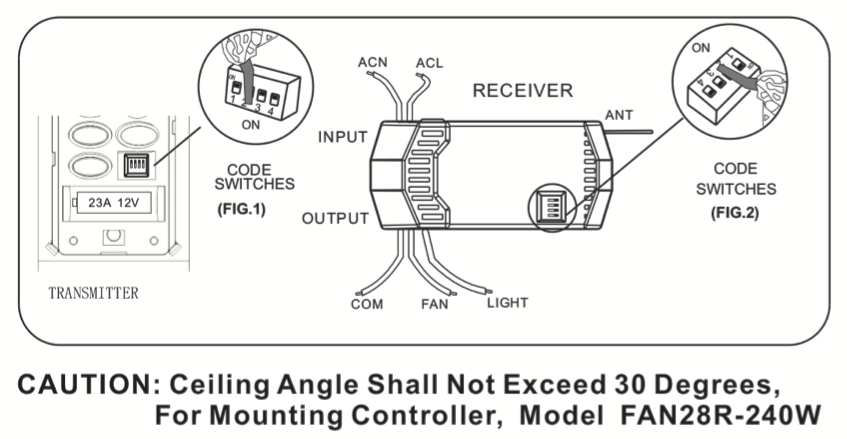
- Slide code switches to your choice of up or down position. Factory settings are all up. Do not use this position. Use a small screwdriver or ballpoint pen to slide firmly up or down (Figure 1).
B. SETTING CODE ON THE RECEIVER
- Slide code switches to the same position as set on your transmitter (Figure 2) •.
- Replace the battery cover on the transmitter.
OPERATING THE TRANSMITTER
- Install A 23A battery (not included). To prevent damage to the transmitter, remove the battery if it is not used for a long time.
- Store the transmitter away from excessive heat or humidity.
- This remote control unit is equipped with 16 code combinations. If you find that your fan and light kit turn on and off unexpectedly without your remote control, change the code combination on your transmitter and receiver.
- Operating the buttons on the panel of the transmitter
- HI Key: for fan high speed.
- MED Key: for fan medium speed
- LOW Key: for fan low speed.
- OFF Key: for fan off.
- LIGHT/DIMMER key: for light brightness and off.
LIGHT DIMMING
- The light function is controlled by pressing the LIGHT/DIMMER key down to increase or decrease the light.
- Tap the key quickly to turn the light off or on.
- Keep pressing the button for more than 0.7 seconds, and it becomes a dimmer; the light varies cyclically in 0.8 seconds. The receiver can remember the last status of the light brightness when the light was switched off, so that it can resume adjusting the light brightness.
TROUBLE SHOOTING GUIDE
- Fails to operate
- Power to the receiver?
- Is the receiver wired correctly?
- Fan manual speed control in the highest position?
- Light kit switch turned on?
- Good battery in the transmitter?
- Is the code set at the same positions on both transmitter and receiver?
- won't operate at a distance
If the transmitter operates the fan/light kit when up close, but not at 20 feet away. Try placing the brown antenna wire higher, up through the ceiling/outside the junction box.