RR90395 | Anderic Replacement Remote Control for Toshiba TV User Guide
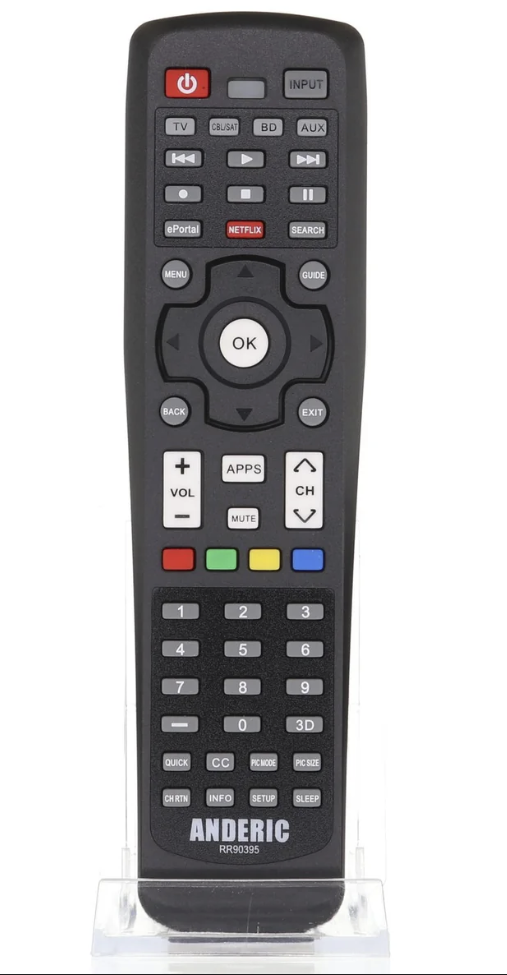
| 1 |
POWER |
Turns the TV on and off. When the TV is on, the power LED indicator on the TV front glows green. |
| 2 |
3D |
Accesses the 3D options. |
| 3 |
Light (Model L7200U) |
Illuminates the keypad for five seconds. |
| 3 |
Sleep (Model L6200U) |
Accesses the sleep timer. |
| 4 |
TV |
TV mode selection button. |
| 5 |
Cable/Satellite |
Cable/Satellite mode selection button. |
| 6 |
Auxiliary |
Auxiliary device mode selection button. |
| 7 |
BD/DVD |
Blu-ray/DVD mode selection button. |
| 8 |
Channel Number Buttons (0–9) |
Directly tunes channels. |
| 9 |
(–) |
Enters 2-part channel numbers. |
| 10 |
INPUT |
Selects the video input source. |
| 11 |
CH RTN |
Returns to the last viewed channel or source. |
| 12 |
VOL (+/-) |
Adjusts the volume level. |
| 13 |
CH (▲/▼) |
Cycles through programmed channels. |
| 14 |
MUTE |
Reduces or turns off the sound. |
| 15 |
INFO |
Displays TV status information as well as program details, when available. |
| 16 |
ePORTAL |
Launches the ePortal page on-screen. |
| 17 |
NETFLIX |
Launches the Netflix® application on-screen. |
| 18 |
SEARCH |
Accesses the SearchAll function. |
| 19 |
APPS |
Launches the Apps window on-screen. |
| 20 |
MENU |
Accesses the main TV menu system. |
| 21 |
GUIDE |
Launches the MediaGuide application on-screen. |
| 22 |
(◄/►) |
Selects on-screen menu options. |
| 23 |
Navigation Buttons (▲/▼/◄/►) |
Selects or adjusts programming menus when a menu is on-screen. |
| 24 |
OK |
Selects the highlighted items on the screen. |
| 25 |
BACK |
Returns to the previous screen. |
| 26 |
EXIT |
Closes on-screen menus. |
| 27 |
REWIND |
Used for TV, Cable/Sat, BD/DVD, and Aux devices. |
| 28 |
PLAY |
Used for TV, Cable/Sat, BD/DVD, and Aux devices. |
| 29 |
FAST FORWARD |
Used for TV, Cable/Sat, BD/DVD, and Aux devices. |
| 30 |
REC |
Used for TV, Cable/Sat, BD/DVD, and Aux devices. |
| 32 |
SETUP |
Used for TV, Cable/Sat, BD/DVD, and Aux devices. |
| 33 |
PAUSE |
Pauses playback. |
| 34 |
QUICK |
Launches the Quick menu. |
| 35 |
CC |
Accesses the closed-caption feature. |
| 36 |
PIC SIZE |
Cycles through the picture sizes. |
| 37 |
PIC MODE |
Selects the picture mode. |
| 38 |
eMANUAL |
Launches the eMANUAL application on-screen. Internet connection required. |
| 39 |
INTERNET |
Launches the web browser on-screen. |
| 40 |
SLEEP (Model L7200U) |
Accesses the sleep timer. |
Did this answer your question?
Thanks for the feedback
There was a problem submitting your feedback. Please try again later.
No results found
.png)
