.png)
AXD7534 | Anderic Replacement Pioneer A/V Receiver Remote Control User Guide
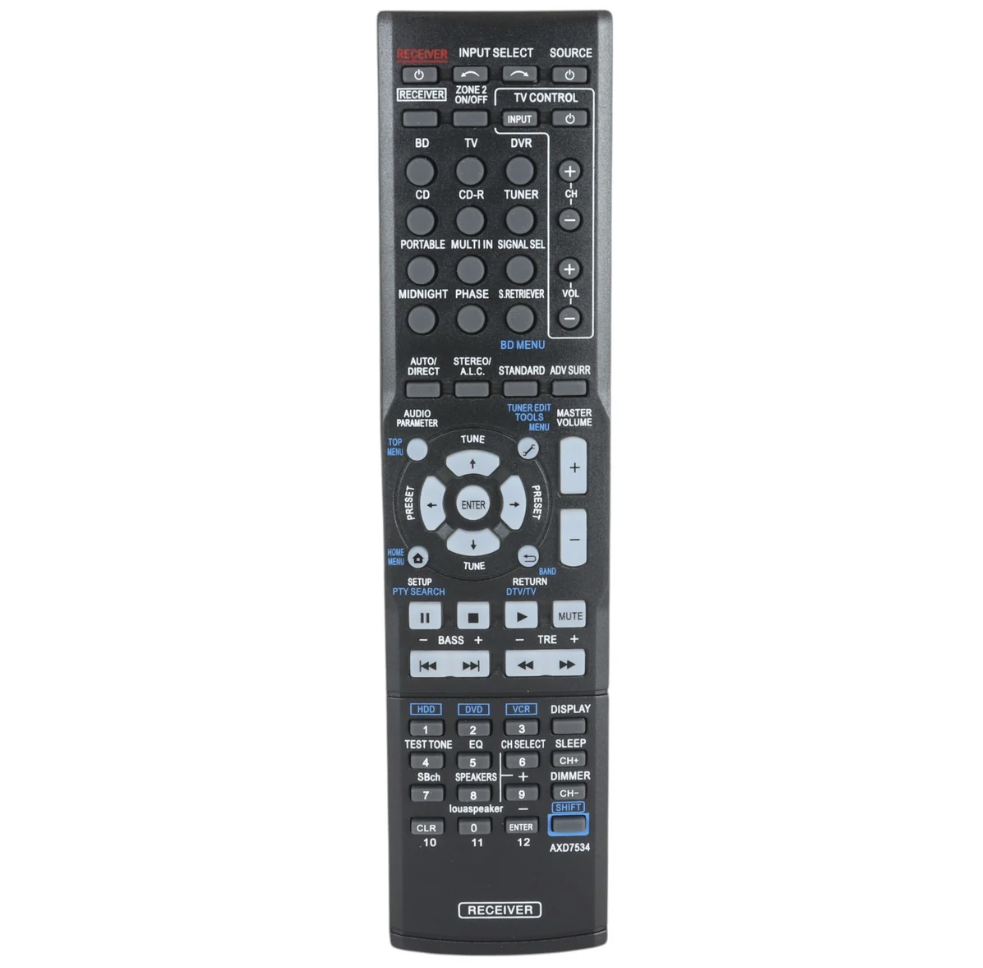
Universal replacement remote for Pioneer audio receivers. The AXD7534 delivers full control over volume, input selection, and receiver functions. Compatible with most Pioneer receiver models. Durable construction built for daily use. Model AXD7534. The AXD7534 is a compatible substitute for the following models: AXD7692, AXD7622, AXD7691, AXD7692, AXD7622, AXD7666, AXD7621, AXD7619, AXD7595, AXD7583, AXD7535
No need to program; just install 2 new AAA batteries (NOT INCLUDED), and then it works.
This is a New Replacement IR Remote Control.
Button Functions
Power and Basic Operation
- Receiver Power (Standby/On): Turns the AV receiver on or puts it into standby mode.
- Master Volume Up/Down (+ / -): Adjusts the overall output volume level.
- Muting: Instantly silences the audio output; press again to restore sound.
Input Selection
- BD / DVD / DVR / TV / CD / Tuner: Directly switches the active audio/video input source.
- Video / Portable / USB: Selects auxiliary front or portable inputs depending on the specific receiver model.
Audio and Surround Controls
- Listening Mode Buttons (Auto / Standard / Advanced Surround): Cycles through surround sound formats like Dolby Digital, DTS, Stereo, or multi-channel movie/music modes.
- Audio Parameter: Accesses fine-tuning adjustments for features like tone, phase control, and channel levels.
- MCACC / Setup: Launches the receiver's automatic acoustic calibration or manual speaker setup menu.
Menu Navigation
- Home Menu / Receiver Menu: Opens the main configuration interface on your connected TV screen.
- Arrow / Cursor Keys (Up, Down, Left, Right): Move through on-screen menu options.
- Enter / Return (Exit): Confirms menu selections or steps back to the previous screen.