.png)
RRTX045LR, A25-TX045-LR | Anderic Ceiling Fan Remote Control User Guide

Thank you for purchasing the Anderic RRTX045LR ceiling fan remote control. The RRTX045LR is designed specifically for ceiling fans that require the A25-TX045-LR remote control, such as the Home Decorators Collection Makenna 60 in DC ceiling fan. The FCC ID reads: 2BLBD-FA0248
Pairing the Remote Control
- Remove the battery cover by pressing firmly on the arrow and sliding the cover off.
- Install two 1.5V AAA batteries (sold separately).
- Turn the power to the fan off, either by the wall switch or the circuit breaker.
- Wait a few seconds, then restore power to the fan.
- Within 30 seconds, press and release the "LEARN" key inside the battery compartment. If pairing succeeds, the fan's light kit will flash, and the blades will spin.
- Replace the battery cover on the remote control.
Installing the Wall Mount
Position the wall-mount cradle in the desired location and secure it to the wall with the provided screws. If mounting on drywall, consider using anchors (not included) for added stability.
How to Operate
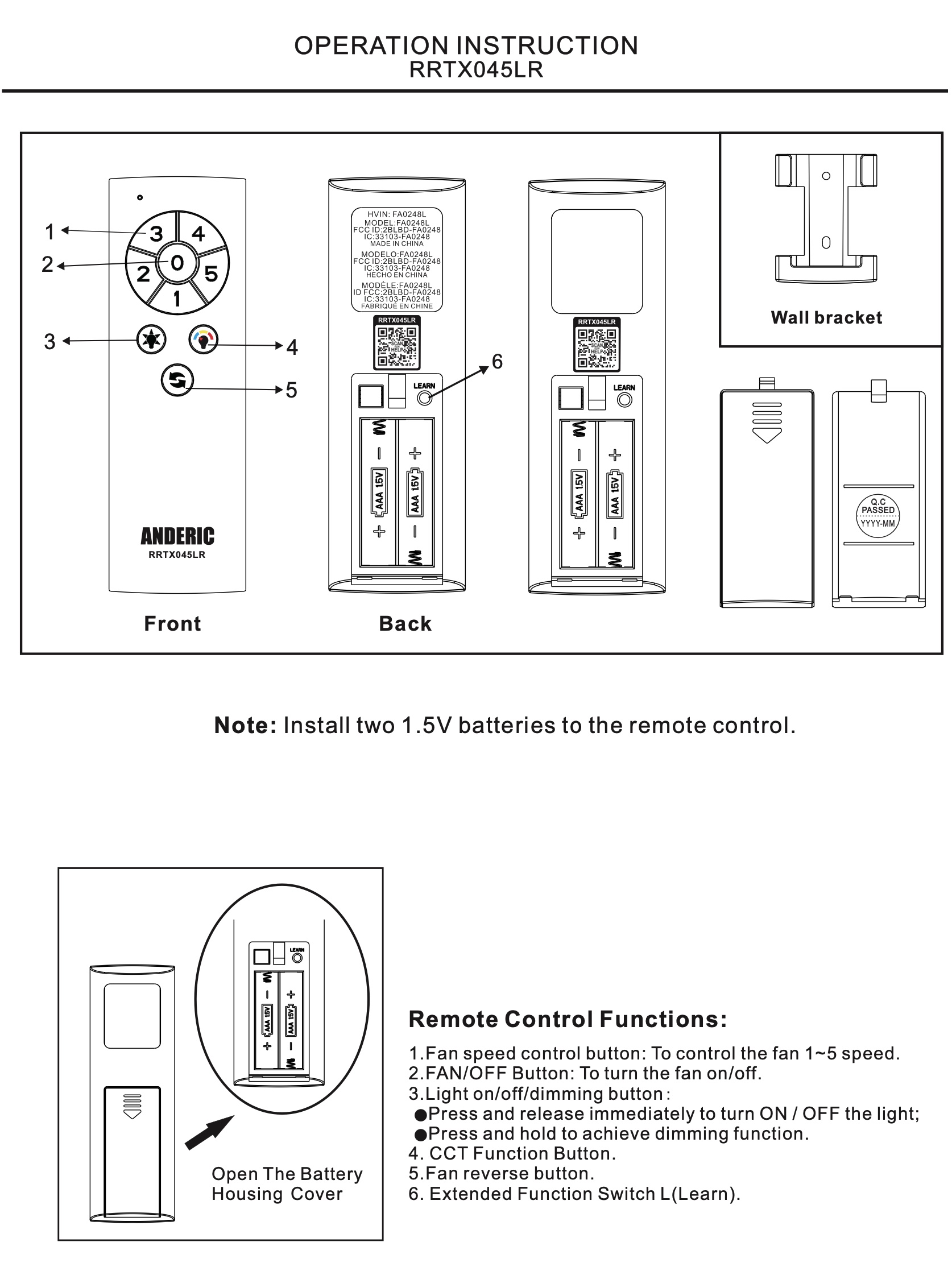
See the Fig 1. image below for reference.
- 1-5 keys: Adjust the fan spin speed, with "1" being the slowest and "5" being the fastest.
- 0 key: Turns the fan and lights off.
- Light - on/off/dim: This key controls the light's on/off and dimming functions. Press and hold to cycle through dimming.
- CCT (Correlated Color Temperature) Key: This key allows the temperature (color) of the light to be changed. With each press, the lights will cycle through the following colors.
- 2700K Warm White
- 3000K Soft White
- 3500K Neutral White
- 4000/4100K Cool White
- 5000K Daylight
- 6500K Cool Daylight
- Reverse key: Press and release to change the fan's direction. Note: The fan will not reverse direction unless it is already moving; it must be on and the blades spinning.
- Warm-weather (forward): A downward airflow creates a cooling effect. This allows you to set your air conditioner in a higher setting without affecting your comfort.
- Cool-weather (reverse): An upward airflow moves warm air off of the ceiling, allowing you to set your heating unit on a lower setting without affecting your comfort.
- LEARN key: This key pairs the remote to the fan.
Troubleshooting
The Remote Will Not Pair
Follow these pairing steps exactly:
- Install two fresh AAA batteries.
- Turn power to the fan OFF using the wall switch or circuit breaker.
- Wait 10 seconds.
- Turn power back ON.
- Within 30 seconds, press and release the LEARN button located inside the battery compartment.
- If successful:
- The light will flash.
- The fan blades will briefly spin.
If pairing still fails
- Repeat the pairing procedure from the beginning.
- Make sure you press the LEARN button within 30 seconds after power is restored.
- Stay within 10-20 feet of the fan.
- Replace the batteries with a fresh set, even if the current batteries appear to work.
- Remove nearby sources of RF interference if possible.
If the fan never flashes or spins during pairing, verify that your fan originally used an A25-TX045-LR remote.
The Fan Does Not Respond
Check the batteries
Install a fresh set of alkaline AAA batteries.
Avoid rechargeable batteries while troubleshooting.
Verify power
- Confirm the wall switch is ON.
- Check the home’s circuit breaker.
- If available, verify the fan still has power using another control.
Confirm the remote is paired
If the fan has lost memory due to a power interruption, simply pair the remote again using the pairing procedure above.
Check operating distance
The remote normally works within approximately 10-20 feet.
Walls, metal objects, and electrical interference may reduce operating range.
The Light Works But the Fan Does Not
- Press one of the speed buttons (1-5).
- Wait several seconds for the DC motor to begin spinning.
- Try a different speed.
If the fan still will not run:
- Re-pair the remote.
- Verify the fan blades can rotate freely.
- Check that the fan has power.
The Fan Works But the Light Does Not
- Press the Light button once.
- Hold the Light button to test the dimming function.
- Verify the light kit and LED module are properly installed.
If the light still does not operate after pairing, the issue is likely within the fan’s light kit rather than the remote.
The Reverse Button Does Not Work
This is normal if the fan is stopped.
The Reverse button only works while the fan blades are already spinning.
- Turn the fan on.
- Allow the blades to rotate.
- Press the Reverse button once.
The fan should reverse direction after a brief pause.
The Light Color Will Not Change
Press the CCT button repeatedly.
Each press cycles through:
- 2700K Warm White
- 3000K Soft White
- 3500K Neutral White
- 4000K Cool White
- 5000K Daylight
- 6500K Cool Daylight
If nothing changes:
- Verify your ceiling fan supports adjustable color temperature.
- Not all compatible fans include this feature.
The Light Will Not Dim
Press and hold the Light button.
The brightness should continuously cycle brighter and dimmer.
If the light does not dim:
- Verify your fan includes a dimmable LED light kit.
- Some LED modules only support ON/OFF operation.
The Fan Moves Backward Then Forward During Startup
This is completely normal.
DC ceiling fans briefly rotate during startup while the motor aligns its internal magnetic poles.
This is part of normal operation and is not a defect.
The Fan Is Noisy
Check the following:
- Tighten all motor housing screws.
- Tighten every blade screw.
- Tighten all blade arm screws.
- Ensure the canopy is not touching the ceiling.
- Verify wire nuts inside the canopy are not rattling.
- Tighten any glass shade or light kit hardware.
If the fan is new, allow up to 24 hours of normal operation. Many minor noises disappear after the break-in period.
The Fan Wobbles
Most wobble issues are caused by loose hardware or uneven blade height.
Check:
- Blade screws
- Blade arm screws
- Mounting hardware
If the fan still wobbles:
- Measure the distance from each blade tip to the ceiling.
- Each blade should be within 1/8 inch of the others.
- Run the fan for approximately 10 minutes.
If wobble continues, the fan may require a balancing kit.
Frequently Asked Questions
Do I need to pair the remote every time I change the batteries?
No. Battery replacement normally does not erase pairing.
Will the remote work with every Home Decorators Collection fan?
No. It is only compatible with fans that originally used the A25-TX045-LR remote.
How many fan speeds are available?
Five speeds.
- 1 = Lowest
- 5 = Highest
Can I turn both the fan and light off with one button?
Yes.
Press the 0 button to turn both the fan and light off.
How do I change airflow direction?
The fan must already be spinning.
Press the Reverse button once to switch between forward and reverse operation.
Still Need Help?
If you have completed all troubleshooting steps and the fan still does not respond, please have the following information available before contacting support:
- Ceiling fan brand and model number
- Original remote model number (if available)
- FCC ID from the original remote (if available)
- Description of what the fan does when attempting to pair (light flash, blade movement, or no response)
- Approximately how old the ceiling fan is
Providing this information will help us determine compatibility and resolve your issue more quickly.